Jesse Edelstein//July 16th, 2025
An FDE's Code Migration Field Notes
Since we launched Amp, we have gotten a ton of questions from customers about using AI for code migration. And I get it, devs don’t want to spend time on toil.
As an FDE, I have gotten to spend a ton of time using Amp to automate code migrations both for customers and internal projects.
Here are a few examples of migrations that the FDE team has run:
- .NET Framework to .NET Core
- The migration allows for the .NET application to be hosted on Linux as opposed to Windows dependencies of the old version.
- Vue 2 to Vue 3 Migration
- Introduced many breaking changes and incompatibilities with sub-dependencies.
- Monolith Decomposition into Microservices
- Required significant architectural changes and import refactoring.
The following is a list of helpful techniques and strategies for running successful migrations.
Use Planning Phases
Amp does really well on discrete, well-scoped tasks. I found the following questions super helpful to ask the agent before editing any code:
- What online resources are available to support the migration? Use the web search tool for this!
- Which additional dependencies need to be upgraded to support the migration?
- How should we order our tasks? Will accomplishing one task first make the rest easier?
Here is an example of a prompt I used to plan for the Vue migration:
I want to prepare for a migration from Vue 2 to Vue 3. Your job is to compile a list of requirements for success in the migration. Some things to think about during the planning process:

- Pay special attention to any breaking changes listed at this url: https://v3-migration.vuejs.org/breaking-changes/
- Keep track of any sub-dependencies that will be outdated and might introduce further breaking changes.
- Consider how the build environment might change due to any package updates
Explore With the Agent
I recommend resisting the urge to cram all of your context into a single prompt. Instead, I found it helpful to consider myself as a conversational partner to the agent. The first few prompts are your opportunity to dynamically plan. Here are a couple questions I asked in preparation for a .NET migration:
How necessary and complex is the Castle Windsor migration? Do we need it for .NET Core?
Why do I need to upgrade the Entity Framework in addition to the WCF Server APIs?
This kind of planning is a great way to catch common failure modes proactively. I also found it super helpful to actually pay attention to the TODOs of the agent.
Customize Your AGENTS.md File
Feedback loops are super important. Otherwise Amp won’t know how to check its work and you will be stuck manually course correcting the agent.
Your AGENTS.md is Amp’s guide to your environment. Here is a list of suggestions for what to include:
- Aggregate existing rules in configuration files generated by other coding agents
- Generate a list of build/lint/test commands for the agent to use
- Analysis of existing style conventions including imports, formatting, types, naming conventions, error handling, etc.
Here is our very own Amp repository AGENTS.md file:
# Amp Codebase Memory

Amp is the frontier agent designed to assist with software engineering tasks. The core functionality lives in the `core` folder, which contains the agent's central logic, tools implementation, and thread management. A thread represents a conversation with the AI agent, with all messages, context, and tool calls.

Amp is primarily used through the CLI (`cli/` - command-line interface with user-facing messages). The ampcode.com server and web app (`server/` - SvelteKit web app) handle thread syncing and user/team management.

## Build & Commands

- Typecheck and lint everything: `pnpm check` (for just TypeScript typechecking: `pnpm exec tsc -b`)
- Fix linting/formatting: `pnpm check:fix`
- Run tests: `pnpm -C ${core|web|server|cli} test --run --no-color`
- Run single test: `pnpm -C ${core|web|server|cli} test --run --no-color src/file.test.ts` or `pnpm test -C ${core|web|server|cli} --run src/file.test.ts -t "test name"`
- Run all tests: `pnpm test:all`
- Check summary playground: `pnpm -C summary-playground check`
- `server/` dev server: already running at https://localhost:2000

## Code Style

- TypeScript: Strict mode with exactOptionalPropertyTypes, noUncheckedIndexedAccess
- Tabs for indentation (2 spaces for YAML/JSON/MD)
- Single quotes, no semicolons, trailing commas
- Use JSDoc docstrings for documenting TypeScript definitions, not `//` comments
- 100 character line limit
- Imports: Use consistent-type-imports
- Use Tailwind CSS classes
- Svelte components use snake-case filenames
- Use Observable pattern for reactive state (using the `@sourcegraph/observable` module)
  - Use `Observable.of(value)` to create an observable that emits a single value
- Use descriptive variable/function names
- In CamelCase names, use "URL" (not "Url"), "API" (not "Api"), "ID" (not "Id"), etc.
- Prefer functional programming patterns
- Use TypeScript interfaces for public APIs
- NEVER use `@ts-expect-error` or `@ts-ignore` or similar to suppress type errors. That is a VERY BAD testing practice.
- NEVER add comments in place of deleted code saying why you deleted it
- Import Node.js stdlib modules with the `node:` prefix (e.g., `node:crypto` not `crypto`)
- The internal API for client-to-server communication is `POST /api/internal`, defined in api/types/src/internal-api.ts.
- Prefer logger module `@sourcegraph/amp-core/src/common/logger` over `console.log` for logging

## Testing

- When writing or updating tests, do it one test case at a time. Don't update or run all of the tests at the same time.
- Use `expect(VALUE).toXyz(...)` instead of `const myVar = VALUE; expect(VALUE).toXyz(...)` unless `myVar` needs to be used elsewhere
- Only add comments in tests when they are absolutely critical to understand what is happening
- In tests, use `newThreadID()` for fixtures instead of literal strings
- In tests, use `newMockThread()` for an empty thread
- Omit "should" from test names (e.g., `it("does foo")` not `it("should do foo")`)
- Don't use TypeScript as and any-type (unless they are absolutely necessary). Instead, use Pick<T, 'key1' | 'key2'> and make the functions being tested have parameters of that type as well (with just the values they need).

## Storybooks

- For significant UI component additions or changes, update the storybooks. We don't use the official Storybook, just normal Svelte components, etc., in file paths containing `storybook` in `server/` and `cli/`. When adding a new story, create or edit a separate file `$(component-name)-story.svelte` and then use it in the main `storybook/+page.svelte` file like the others.
- You can access a storybook directly at `/storybook/${story-title}`

## Git Workflow

- ALWAYS run `pnpm check` before committing any code
- Fix any linting errors with `pnpm check:fix` before committing
- Run `pnpm build` to verify typecheck passes before committing
- Run `pnpm test --run` when testable code has been modified

### Git Safety Rules

**CRITICAL**: NEVER use `git push --force` (or `git push -f`) on the `main` branch. Force pushing to main can permanently destroy commit history and cause serious issues for other developers.

**CRITICAL**: NEVER automatically commit when on the `main` branch unless the user explicitly instructs for this to happen. When they do ask for a commit, ask for clarification of which files to commit, and never commit all files unless specifically instructed.

- Use `git push --force-with-lease` if you absolutely must force push to a feature branch
- Always verify the current branch with `git branch` before any force push operation

## Code Formatting

- Always format any files you modify using the `format_file` tool
- After implementing a feature or fixing a bug, format all changed files

## Security and Information Protection

- Use appropriate data types that limit exposure of sensitive user information:
  - `BasicUser`: For public contexts, only shows id, name, and profile picture (no email)
  - `TeamMember`: For team contexts, shows basic info plus email
  - Full `User` type: Only expose when absolutely necessary (e.g., site admin views or own profile)
- Apply context-based information sharing:
  - When showing user data in threads, determine what level of detail is appropriate based on relationships
  - Consider team membership when deciding what information to expose
  - Default to minimal information exposure when user relationships are uncertain
- Follow the principle of least privilege when displaying user information

## Configuration Options

When adding new configuration options, you MUST update all three places:

1. **CLI**: Add to `cli/src/settings.ts` with `amp.` prefix for external JSON format
2. **Server UI**: Ensure any related settings pages in `server/src/routes/(app)/settings/` are updated
3. **Docs**: Document in `server/src/routes/(manual)/docs/content/cli/settings.md`

All configuration keys use the `amp.` prefix and MUST be consistently defined across all platforms.

Configuration options MUST be alphabetically sorted in all locations to maintain consistency and readability.

## Podcast RSS Feed

When adding new podcast episodes to the "Raising an Agent" podcast:

1. **Download episodes** from YouTube playlist using `yt-dlp "https://www.youtube.com/playlist?list=PL6zLuuRVa1_iUNbel-8MxxpqKIyesaubA" --format mp4 --output "%(title)s.%(ext)s"`
2. **Upload video files** to Google Cloud Storage at https://console.cloud.google.com/storage/browser/static.ampcode.com/podcast;tab=objects?inv=1&invt=Ab2mlg&pageState=(%22StorageObjectListTable%22:(%22f%22:%22%255B%255D%22))&prefix=&forceOnObjectsSortingFiltering=false
3. **Update the episode data** in `server/src/routes/podcast.rss/+server.ts` in the `getPodcastEpisodes()` function array with:
   - Episode metadata (descriptions and durations can be automatically populated by fetching from https://open.spotify.com/show/1AL44JiuDAszIPDnLNzBIu using the `read_web_page` tool)
   - Video file URLs pointing to `https://static.ampcode.com/podcast/{filename}`
   - File sizes in bytes (use `ls -la *.mp4` to get file sizes)
4. **Validate the feed** by testing `https://localhost:2000/podcast.rss` (which uses a self-signed certificate) and ensuring it's accessible without authentication and contains proper `<enclosure>` tags

The RSS feed includes iTunes podcast tags, Podcasting 2.0 namespace tags, and enclosure elements for proper podcast app compatibility.

## Deployed environments

The Amp deployments are operated by the [Managed Services Platform](https://www.notion.so/sourcegraph/Managed-Services-Platform-MSP-712a0389f54c4d3a90d069aa2d979a59#b91bc6e6ccb84b04831443e266b92815). You can get information for interacting with Amp environments using `sg msp operations amp` and `sg msp operations amp <environment>`.

For all `sg msp` commands, the `--help` flag can be used to learn more about the command.

Refer to [server/README.md](server/README.md) to answer other questions around Amp deployments and deployed resources.
I like thinking of the AGENTS.md file like a combination of agent memory and an extension of the system prompt. It’s your opportunity to influence the behavior of the agent.
Some things that we don’t include in AGENTS.md:
- Things the model is already trained on. You don’t need to tell Amp how to format a git commit command. It already knows how to do that.
- Super long content. AGENTS.md files get loaded into every thread so you don’t want to add irrelevant content.
One File First
Most migrations are super repetitive. I find it helpful to guide the agent through the migration of a single file first, before tackling the full set. This was crucial for the Vue 2 to 3 migration.
This produces the most valuable kind of context for the agent. You can then tell Amp to use it as a reference going forward:
Check the diffs in @HeaderComponent.vue on the most recent commit and use it as a template to complete step 2 of the migration in plan.mdYou can even add the path to your AGENTS.md file to keep as context across threads.
Sub-Agents and Context Window Management
I experimented a lot with pushing context windows to their limit and found that performance starts to degrade when they’re about 80% full (see How Long Contexts Fail). I love Amp’s subagents because they have a separate context window and only return the most important information. This is ideal for the following scenarios:
- Researching an adjacent topic where the agent needs to review lots of documentation
- Executing distinct tasks that are prerequisites for main thread actions
- Analyze source code to get a better understanding of requirements for a feature
I generally don’t force Amp to use multiple subagents. If it’s appropriate for the task it will do it on its own. If it isn’t, you can end up with conflicting edits (see Agents for the Agent) for more.

Amp with Subagents
Leverage CLI Tools
External tools are critical for running successful migrations. However, too many specialized tools can bloat the context window and confuse the agent. Since Amp inherits your global bash environment, we recommend using well-documented CLI tools for migration-specific tasks.
Here are a few examples of improved workflows with Bash tools:
.NET Framework to .NET Core migration
Ensure you have downloaded the dotnet upgrade assistant CLI tool for your appropriate dotnet version.
Prompt Amp:
Read the dotnet upgrade assistant docs to determine how to customize your configuration: https://github.com/dotnet/upgrade-assistant?tab=readme-ov-file. Pay special attention to relevant package mappings. Read all markdown files to better understand how to structure those mappings files. Review the samples/ directory to see examples for how to structure the mappings. When you are ready to run the upgrade assistant use the bash tool to run `upgrade-assistant upgrade`Java Dead Code Cleanup
Make Sure JaCoCo is configured for your environment.
Prompt Amp:
Reference the Java Code Coverage CLI documentation: https://www.jacoco.org/jacoco/trunk/doc/cli.html as well as the agent guide: https://www.jacoco.org/jacoco/trunk/doc/agent.html. Use the Bash tool and the jacoco cli to come up with a comprehensive analysis of classes, files and functions which are unused at runtime. Then begin cleaning up the dead code file by fileGitHub CLI
For a tutorial on using the github cli with Amp see my colleague Geoff’s post.
Use Checklists
The most common concern we hear about using coding agents is “they aren’t exhaustive”. While this is technically true, there are ways to program the behavior of the agent.
The most effective way we have found to achieve this is to make use of checklists. Here is a common workflow for agentic migrations:
Create a Directory Tree Checklist
Can you use the list_files tool to create a directory tree of the entire repository with all svelte files bolded? Also include a check box next to each svelte file. Put the resulting tree in a file called tree.md
Migrate Files and Check Off Completions
Reference tree.md to see all candidate svelte files. Please use subagents to migrate each svelte file from Svelte 4 to Svelte 5 using the guide in guide.md and check off the box when you are done. ONLY CHECK THE BOX WHEN YOU HAVE EDITED THE FILE AND IT PASSES pnpm check.

Snapshot of the Amp Terminal UI
Consult the Oracle
One of our core principles in building Amp is giving the agent access to the best models for a given task. As such we added a tool called the oracle to provide access to complementary models.
The oracle is currently powered by OpenAI’s GPT-5 model and is good at reviewing, debugging and analyzing. Here are some helpful ways to prompt the oracle to give feedback:
Improve the Migration Plan
Use the oracle to compare my plan.md file with any resources you can find online for breaking golang monoliths into microservices. What needs to be changed in the plan?Review Diffs and Update Progress
Consult the oracle to review the current diffs and compare them to the goals of step 2 in plan.md. Which goals were achieved? What still needs to be done?Ask the Oracle to Categorize Error Logs
Please run pnpm run check and then ask the oracle to analyze the error logs and create distinct groups for each category of error. For each category we should also summarize the likely source and remediation strategyUse Hooks for Common Mistakes
Automating code migration entails executing a lot of very similar code changes at scale, so it produces lots of repetitive errors.
Amp’s Hooks are a preview feature designed to respond to a trigger (an Amp tool call) and produce a deterministic response to guide the agent.
You should think of your local hooks configuration as a running log of common failure modes for the agent to avoid.
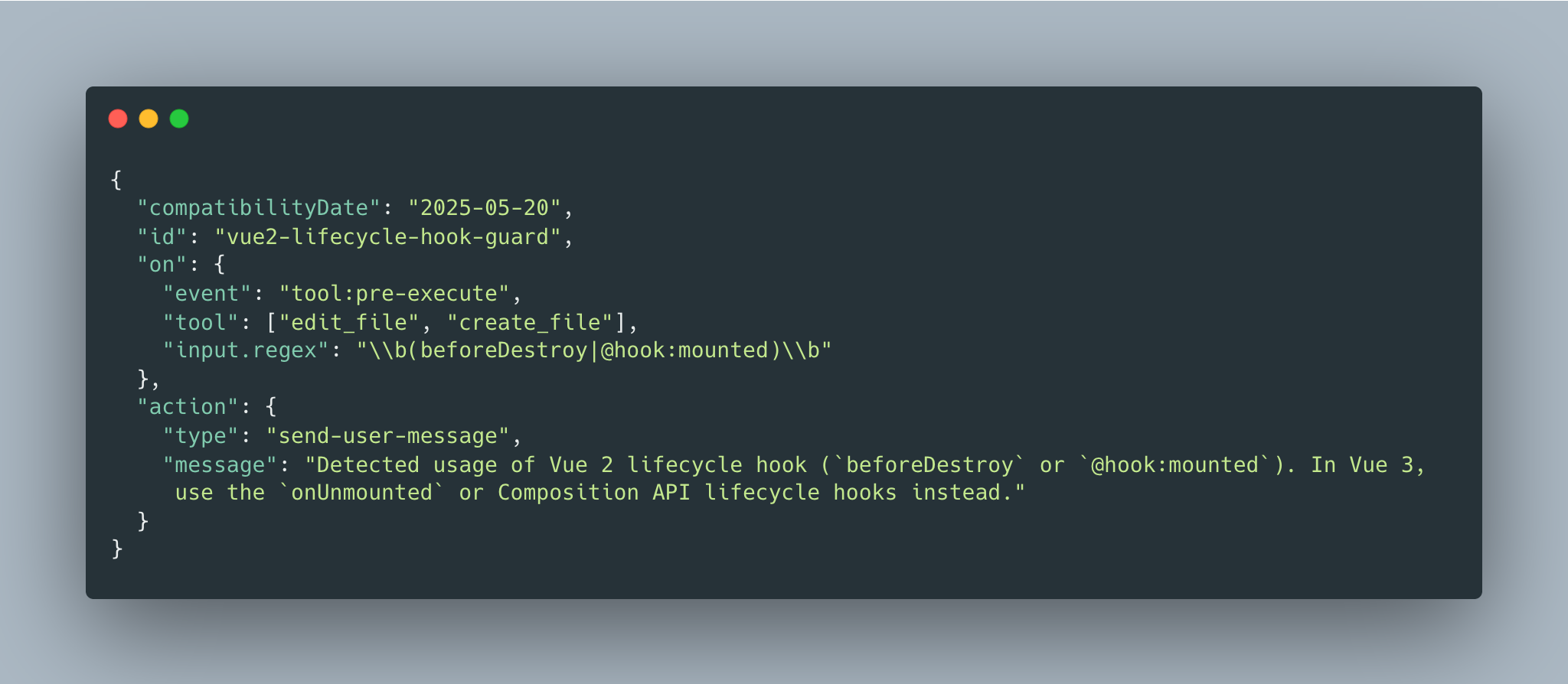
An example snippet from my settings.json file
This hook course corrects any usage of deprecated syntax during the migration. This pattern can be used to address any common mistakes you see the agent make during the migration.
Abandon Sunk Costs
Tools like Amp speed up software development so much that I rarely think about sunk costs. The best kind of feedback is now learned through failure.
If the agent goes off the rails, take note of what went wrong. I found the following questions very helpful in learning from failure:
- What unintended behavior did the agent show and where did it start failing?
- What did the agent do particularly well?
- Are there any tools I could provide that would help remediate the failures?
- Would it make sense to further decompose the work of the agent into smaller subsections to allow me to intervene as necessary?
- Could I improve my prompts to guide the agent in the right direction?
If you have any suggested additions or feedback from using Amp for code migration, please drop them in our Discord or tag me on X @JEdelstein25